felt
When a project spans several days or coding-agent sessions, its decisions often end up scattered across chat transcripts, issue comments, and half-finished notes. felt gives those decisions, questions, and tasks a place beside the work: ordinary Markdown files that you and your agents can read, edit, search, and keep in Git.
felt is a command-line tool for keeping project notes and tasks. Each note is called a fiber. A fiber can record why you chose a method, hold a question you haven't answered, or describe work you want done. You can use felt on its own, with any editor and no background service.
Shuttle is an optional tool for assigning written tasks to coding agents. It uses the same fibers, starts agents in your project, and shows their progress and results in a browser board. Start with felt for notes, or go to Set up Shuttle if you want agents to run tasks.
Keep a decision beside your project
Install felt on macOS or Linux:
curl -fsSL https://raw.githubusercontent.com/cailmdaley/felt/main/install.sh | sh
The installer includes both the felt and shuttle commands.
Getting started covers other installation options and agent integration.
From your project directory, create a place for notes and record a task:
felt init
felt add cache-policy "Choose a cache policy" -s open
This creates .felt/cache-policy/cache-policy.md.
Open it in your editor and write the question, evidence, or constraints below its metadata.
Once you've decided, record the answer:
felt edit cache-policy -s closed \
  -o "Cache parsed inputs by content hash so changed files never reuse stale data."
felt show cache-policy
The task is closed, but its answer stays in the project.
Search for it later with felt ls -s all "cache", or let a coding agent read it before changing the cache.
A fiber is a Markdown document with a small YAML header:
---
name: Choose a cache policy
status: closed
outcome: Cache parsed inputs by content hash so changed files never reuse stale data.
---

Modification times aren't enough: copied inputs can preserve them.
Hashing the input contents gives each cached result a reproducible key.
felt also stamps an identity and timestamps when it creates and edits fibers. Status is optional: a note that records an existing decision doesn't need to become a task.
Grow notes with the work
Keep related fibers in nested directories and connect them with [[wikilinks]] in their text.
Plots, PDFs, and reports can live beside the note that explains them.
The files remain readable in any editor, and .felt/ can open as an Obsidian vault.
Commit them to Git to keep their history; cross-project stores let several projects share one collection.
The agent integration gives Claude Code, Codex, and pi access to this same collection. Agents receive project context at session start and instructions for recording what they learn. The next session can read the conclusion and its reasoning without recovering a whole conversation.
Run written tasks with Shuttle
With Shuttle, a fiber can also describe a result you want an agent to produce. For example: “Make the cache reject stale inputs, and verify it with a test that changes an input file.” You choose the agent and project directory, and Shuttle starts the work.
A background service, called the daemon, watches the registered fiber collections and runs eligible tasks. Its browser board lets you read and edit tasks, follow running agents, and review their results. Agents write results and continuation notes back into the fiber, so another session can continue unfinished work. You can run this on one machine or connect several machines.
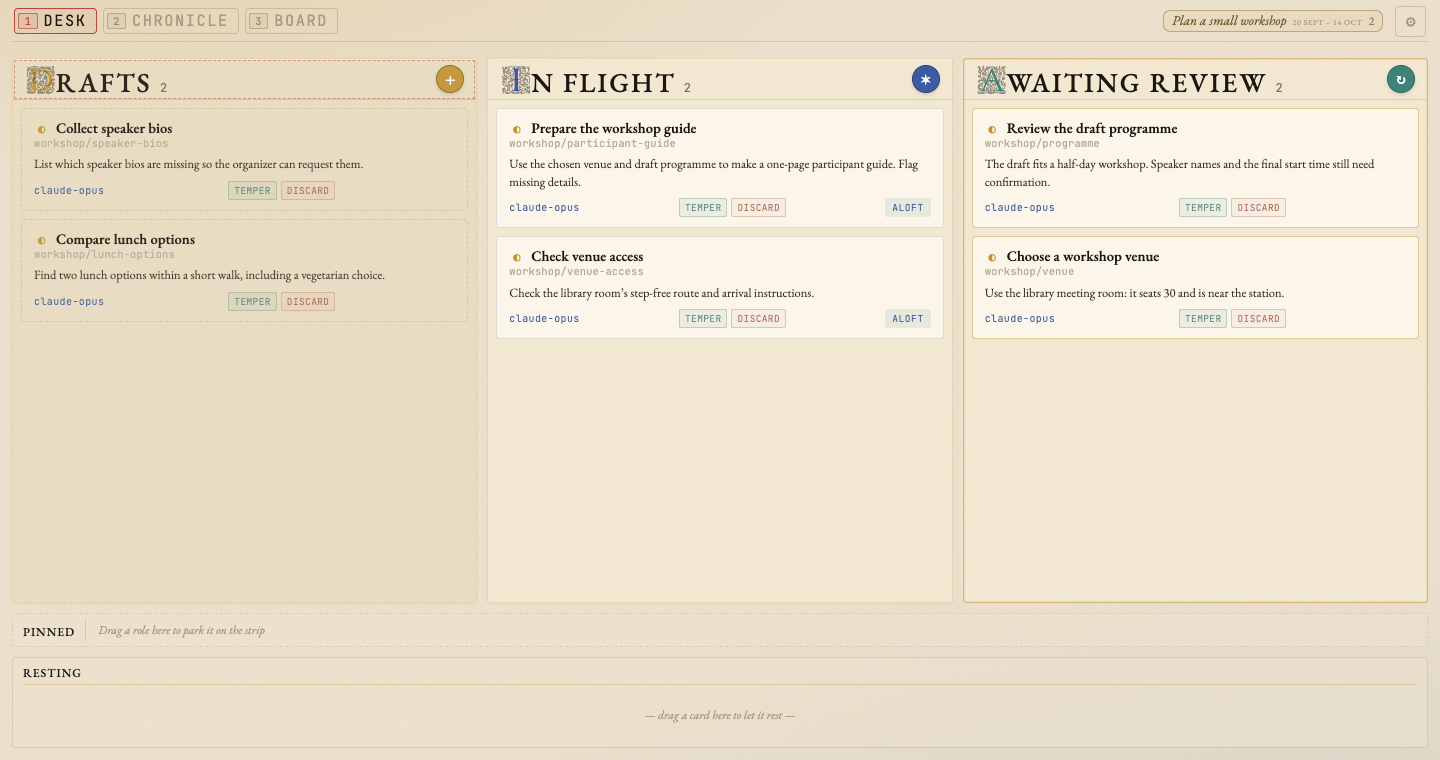
The Shuttle overview explains the task workflow. Set up Shuttle walks through installation and a first task on one machine. Shuttle's service and board are optional; recording and searching notes with felt needs neither.
Continue
| Your next step | Guide |
|---|---|
| Install felt and work through a first note | Getting started |
| Decide when to track a task, nest notes, or link them | Organizing |
| Understand the file format | Fibers and Frontmatter |
| Keep plots, PDFs, and reports with a note | Companion files |
| Give your coding agent project context | Agent integration |
| Assign work to agents and follow it on a board | Shuttle |
| Look up a command | CLI reference |
License
Both Go CLIs and the board UI ship under the
MIT License. The shuttle
daemon (daemon/lib/) contains code derived from OpenAI's Symphony under the
Apache License 2.0,
preserved in NOTICE.
Contributing
Source and issues: github.com/cailmdaley/felt. To build or patch felt, read CONTRIBUTING.md for the setup, and AGENTS.md for the architecture, build and lifecycle, deploy path, and invariants.