The board
The daemon serves the board at http://127.0.0.1:4000/. It is one page with
three full-page views behind a hotkey row, 1–3, and a settings sheet on
⌘,. Everything on it is a view over fibers the daemon already polls, plus
the host-local ledgers — the board stores nothing of its own.
| Key | View | What it answers |
|---|---|---|
1 |
Desk | What needs doing, and what is running right now |
2 |
Chronicle | What a stretch of weeks was about |
3 |
Board | What the work produced |
⌘, |
Settings | Every operator file, on any host in the fleet |
?view=chronicle (or shelf) deep-links a view.
The tab named Board, and the board
Hotkey 3 is titled Board for the reader. Internally it is the
shelf — the view id, the storage keys and the module names all say
shelf, and ?view=shelf is what deep-links it. This page uses "the
board" for the whole surface at :4000 and "the Board tab" for the third
view.
Desk — the kanban
Three surfaces: the Now board of cards that need something, a Pinned strip of perennial roles, and Resting, where snoozed work and standing roles between runs wait.
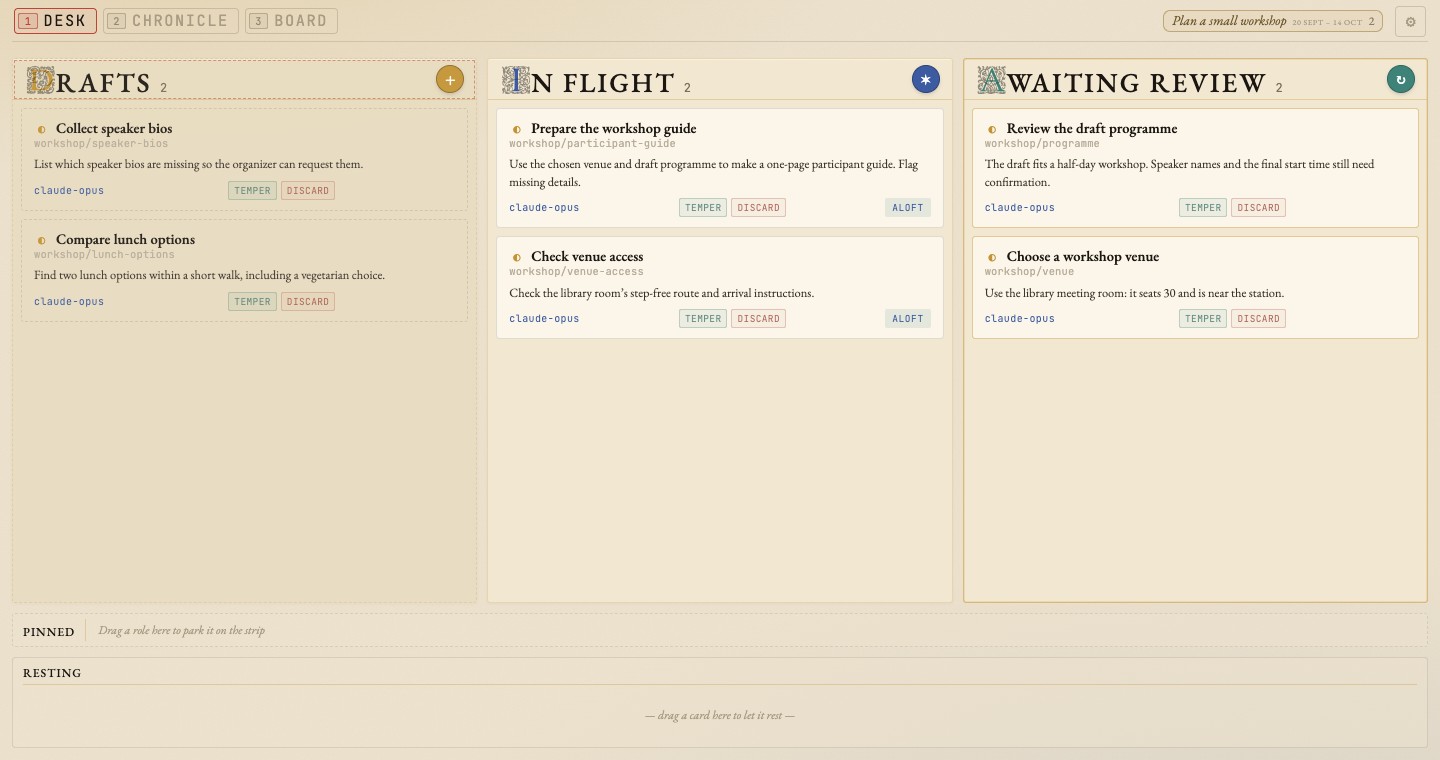
The cards use fictional workshop data.
Each card shows its fiber's outcome, so the venue decision is readable beside the guide that uses it.
Where a card lands is two independent decisions: which column it belongs to, and which horizon it sits on.
Column
The browser computes column membership with classifyFiber
(ui/src/board/KanbanRules.ts). That function decides membership alone, and it
evaluates in this order:
| Column | Condition |
|---|---|
| Cycles | tagged cycle — checked first, unconditionally |
| Tempered | closed + tempered: true |
| Discarded | closed + tempered: false |
| Awaiting review | closed, tempered absent |
| In flight | live tmux worker with a shuttle block — liveness wins over everything below |
| Pinned | resting kind: pinned (open or active) |
| Scheduled | active + kind: standing — drawn in Resting, wearing its next launch |
| In flight | active, other kinds |
| Drafts | anything left, including open |
The cycle branch comes first on purpose. A cycle is an annotation on the calendar rather than work, so it leaves classification before any lifecycle question is asked — otherwise a stray "Autumn 2026" would sit in Drafts forever.
Apart from that one tag, the classifier reads only status, tempered,
kind, and tmux liveness. Neither the daemon nor the board reads tags for
anything else.
Horizon
Column says which lane; horizon says desk or Resting. It is computed by
effectiveHorizon from two frontmatter keys:
horizon: stashedtakes a card off the Now board and puts it in Resting. (The wire format and the API still saystashedeverywhere; "Resting" is what the human is told, because that is what the surface means — deliberately paused work, not a bin of failures.)- A
due:day that is today or already past overrides a storedstashedand pulls the card back onto the desk. That override is what makes snooze a return ticket rather than a black hole. A futuredue:alone changes nothing: the card keeps its place and simply wears the date.
Snooze is the gesture that writes both. Drag a card and a drag horizon
appears under the tab strip — a slim row of upcoming days, plus a chip per
upcoming cycle. Drop on a day for due: + horizon: stashed; drop on a cycle
chip to land on that cycle's start (clamped to tomorrow if it is already
running); drop on today to put it back on the desk; drop into Resting to stash
it dateless.
Gestures
Two gestures carry different meanings. Drag-and-drop advances the card's state. Modal buttons give you another worker on the same run.
Drag-to-tempered acts by kind: on a standing role it accepts and re-arms, on a pinned role it accepts and re-parks to the strip, on a oneshot it writes the terminus. The outcome stays: the last run's digest is the card's headline until the next run writes its own.
Beyond the columns the Desk offers a fiber and file viewer, Stash and Capture dialogs, and Attach. Each card's panel folds a drawer under its title: a message box with New session and Resume, the next launch's agent, effort, session and kind, the card's due day and parent, and Temper / Discard.
Images pasted or dropped into the message box wait there as thumbnails, each
with a × to remove it: PNG, JPEG, GIF or WebP, at most 10 MB each, 8 per send
and 25 MB in total. New session, Resume and Meeting first store them on the
host that owns the fiber (under its data directory's attachments/), then
send the message followed by one [Image: <path>] line per image, so the
worker opens each by path. If the upload fails nothing is sent and the box
says why. While a send is in flight every verb waits and the thumbnails are
frozen. A paste that carries text stays a text paste, even when the copying
app put an image beside it.
Open a worker
The Aloft, Waiting, and Needs you controls open the worker's conversation.
For terminal workers, the board can open Kitty; shuttle attach <fiber> works from other terminals too.
Claude sessions with Remote Control can open in the browser or Claude app, using your browser's preference in Settings.
Codex app workers use their native desktop link, with remote-access guidance on mobile.
See Opening conversations for the choices, prerequisites, and quick-access terminal setup.
Chronicle — where the time went
The activity stream bucketed per minute, joined to fibers through the session and commit ledgers. See Telemetry for what feeds it and what happens when a ledger is absent.
Chronicle draws fibers as multi-day lifelines across calendar days, under a strip of cycle bands. Activity is inked on each lifeline, one mark per civil day; ahead of today a row carries only hollow marks for what is due and what is armed.
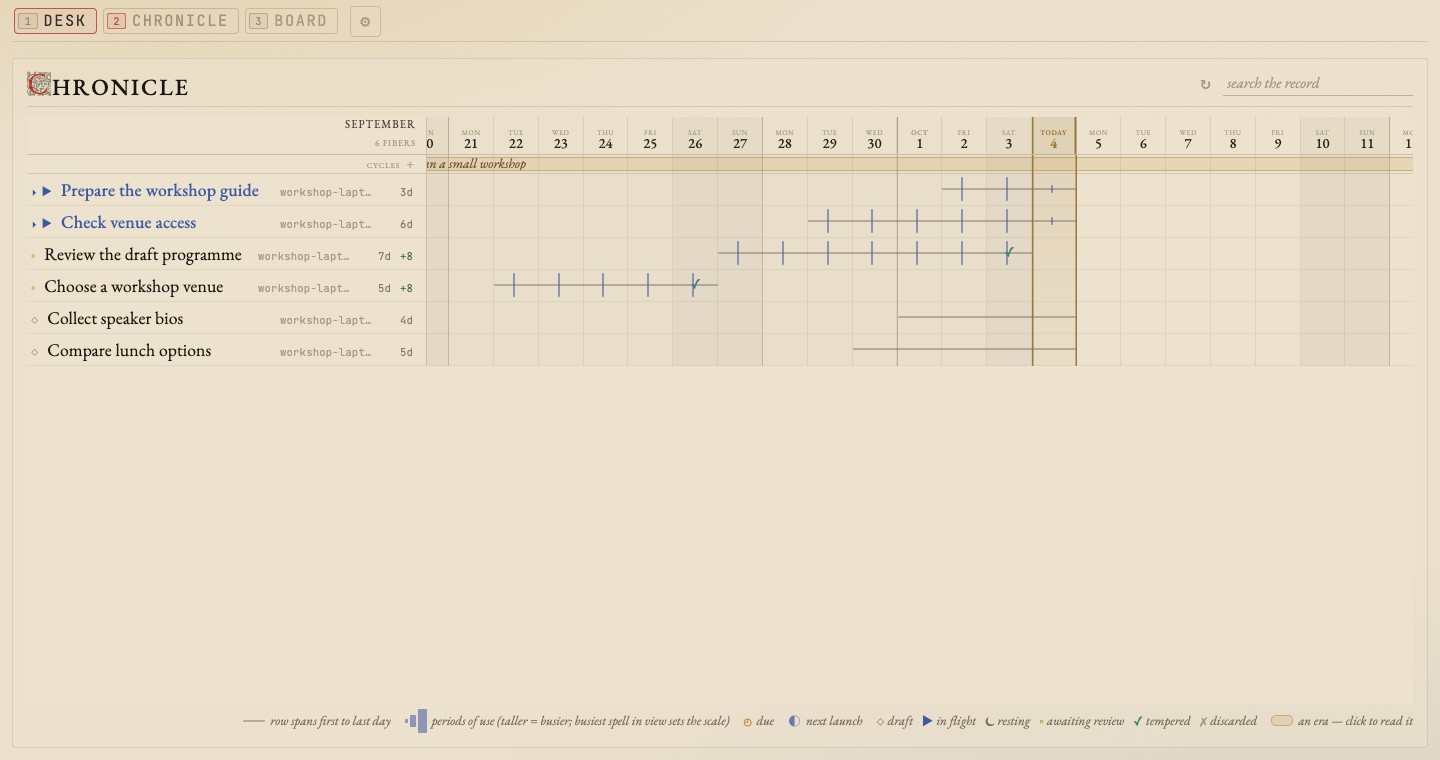
No fill, just marks on a line per fiber, so months of fibers stack without drowning each other. The era strip is the same cycle data that fences the Desk's Cycles column.
Everything on the page is joined through the ledgers. A minute or a commit
that does not resolve to a fiber the board carries is not drawn at all, so work
started outside shuttle is invisible here — and nothing is ever attributed by
reading a slug: prefix out of a commit subject or a directory name.
The record is fetched on demand. The Desk's cards refresh every 15 s, and Chronicle redraws its rows from them, but its temporal feeds — activity, the session ledger, the commit ledger — are fetched when the view opens, again at most every five minutes while it stays open, and whenever you ask with the refresh control. Days already past are fetched once per open; scrolling back fetches only the days newly in view. Nothing on the board asks for temporal data while Chronicle is closed.
Board — what the work produced
Hotkey 3. Every file a worker pushed with shuttle send-file <path> [path...] in the last 30 days,
laid out on a canvas as cards that render their own contents: the report
renders inside its frame, the plot draws, the page is the thing itself rather
than a link to it. A list of filenames is an index of work; a wall of rendered
pages is the work, and you find the one you want by recognising it.
- A card is two layers. The face — name, fiber, age, kind — is synchronous and is the card's resting state, never a skeleton. The body — the iframe, the image, the page — mounts when the card nears the viewport and is taken down again when the canvas carries more live bodies than it can afford.
- Cards are handles, never factories. Every gesture rearranges the canvas; nothing on a card makes another card. Drag the header to move it, the corner to resize, the ✶ to hold it in place, the body to make the frame live.
- Nothing overlaps, except a pile — one fiber's work gathered by the fiber lens.
- Reading happens in the Reader. The ↗ sends a file to one overlay window
with its own tab strip, because shuttle runs as a dock web-app where every
window.openwould otherwise become a separate window.
The feed is /api/v1/sent-files/all (with a /composite sibling that fans in
every host a hub aggregates — the fleet), which reads the host's event
stream. A host with no event stream shows an empty canvas — see
Telemetry.
The board is optional, and the bundle is its own artifact
A fetched daemon already has it: CI builds the bundle and copies it into the
release's own priv/, so a downloaded daemon serves the board with no Node
anywhere in sight.
A checkout serves ui/dist from the checkout, and the repo does not ship that.
Build it with:
make ui # npm ci when the lockfile changed, then npm run build
A fresh clone builds it fine — no private checkout needed (see Sharp
edges). make build, make restart and make
all all include this step; SKIP_UI=1 leaves the bundle alone, which is how a
host that takes its bundle from elsewhere is built.
SHUTTLE_UI_DIST overrides both, pointing the daemon at any built bundle on
disk.
Without the bundle the root URL 404s with a hint, and the API stays fully
usable. If you change any /api/v1/* route, rebuild the bundle — a stale
bundle against a changed route table fails silently as a 404.
Settings
⌘, opens the settings sheet, and so does a bare ,: the board's own idiom
is bare keys, and a phone has no ⌘. The ⚙︎ closing the tab strip does the
same with a pointer, pinned to the right edge on a phone so it never scrolls
out of reach. Esc closes it. It is an overlay rather than a fourth tab — the
three tabs are windows onto the work, and configuration is not work.
Settings opens to Conversations, where you choose the default Aloft action for Claude sessions. The conversation-opening preference belongs to this browser and saves immediately. Right-click Aloft to choose another supported opening route for that session without changing your default.
Host settings sit separately under Worker hosts. The host picker selects which machine the remaining configuration addresses. The board is reachable from a phone and from a second hub, so the machine you are configuring is usually not the one you are sitting at; every read and write on the sheet carries the chosen host's origin and is owner-routed to the daemon that owns the file. Configuring a remote needs that remote's daemon to be recent enough to serve the config routes; an older one says so.
| Section | What it holds |
|---|---|
| Conversations | The default for opening Claude conversations in this browser; worker execution stays unchanged |
| Notes & tasks | stores.json — the store list this daemon is configured with, and the symlinked substores it reaches through them |
| Project folders | projects.json — the checkouts Stash and Capture offer; adding one initializes its .felt/ |
| Worker agents | The merged registry, each record marked with the layer it came from, with a default-effort select per agent (written as an overrides entry), over agents.json |
| Connected hosts | remotes.json as rows — how each remote is reached, whether it answered, what build it is running — plus the supervised tunnel jobs derived from it |
| Access & listening | Whether this is a personal or shared machine, and who can reach its daemon |
| Daemon status | Build, CLI contract, poll health, running workers, and the boot quarantine |
Host configuration sections offer an advanced text editor for their files. That is what makes
the sheet hold all the configuration rather than all of it there is a widget
for, and it is the only safe way to touch remotes.json: a structured round
trip drops every key the model does not know about, and that file carries
several (auth, ssh_flags, tunnel.label, per-entry timeouts) that
shuttle remotes add has no flag for. A save is refused unless the tool
that really reads the file accepts it first, and the refusal is that tool's own
sentence — see the API reference.
Two things the sheet will not do. It will not edit ~/.shuttle/host: the
daemon freezes its host id at boot, so a file rewritten under a live daemon
would leave the CLI and the dispatcher disagreeing about what this machine is
called, and that is the worst failure this system has. And when SHUTTLE_STORES
or SHUTTLE_PROJECTS is set in a daemon's environment — which overrides the
file's contents outright — the section says so and turns editing off, rather
than letting you carefully fix a setting that has no effect.
A card that never appears at all is usually a dispatch question rather than a board question — see Diagnosing a missing card.